

Visual content is essential for modern marketing and creative projects, but finding the right images can be both challenging and expensive. We understand the importance of exploring a service before committing, which is why Adobe Stock’s free trial deserves our attention.
As part of Adobe’s comprehensive creative suite, Adobe Stock offers millions of high-quality images, videos, and vectors. We’ve examined their free trial program to help you understand how to make the most of this opportunity while avoiding any unexpected charges or complications. Whether you’re a professional designer, marketer, or content creator, this trial period lets you test Adobe Stock’s vast library and seamless integration with other Adobe products.
What Is Adobe Stock and Why You Need It
Adobe Stock serves as a premium digital asset marketplace integrated within Adobe Creative Cloud applications. The platform offers 300+ million high-quality assets including photos, videos, vectors, illustrations, templates, and 3D content.
Adobe Stock emerged as a successor to Dollar Photo Club, providing enhanced features and seamless integration with Adobe’s creative applications. Here’s what makes Adobe Stock essential:
- Direct integration with Creative Cloud apps enables instant asset previews in Photoshop, Illustrator, and InDesign
- Advanced AI-powered visual search finds similar images based on composition, color, or style
- Built-in licensing system tracks usage rights across team projects
- Premium collections feature exclusive content from industry-leading creators
- Auto-tagging technology enables precise keyword searches for specific visual elements
Key features of Adobe Stock include:
- Royalty-free licensing for commercial use
- Regular content updates with 100,000+ new assets daily
- 4K video content optimized for professional productions
- Pre-designed templates for social media, print, and web projects
- Enterprise-level asset management tools
The Adobe Stock Free Trial provides access to these premium features, allowing users to test the platform’s capabilities without immediate financial commitment. Unlike other stock photo services, Adobe Stock integrates directly into existing creative workflows through Creative Cloud applications.
| Asset Type | Available Content |
|---|---|
| Photos | 200+ million |
| Vectors | 20+ million |
| Videos | 26+ million |
| Templates | 1+ million |
| 3D Assets | 500,000+ |
Understanding the Adobe Stock Free Trial Offer

Adobe Stock’s free trial provides users with 10 complimentary standard assets within a 30-day evaluation period. This offer enables creative professionals to explore Adobe Stock’s premium content while maintaining full commercial licensing rights for downloaded assets.
Trial Duration and Limitations
The Adobe Stock free trial runs for 30 consecutive days from the activation date. Users receive 10 standard asset downloads with perpetual commercial licenses. The trial automatically converts to a paid subscription after 30 days if not canceled. Downloaded assets remain licensed for use even after trial cancellation. Premium assets such as extended licenses or Premium collection items aren’t included in the free trial downloads.
- Photos: High-resolution stock photography for marketing materials
- Vectors: Scalable graphics for logos and illustrations
- Templates: Pre-designed layouts for social media posts
- Illustrations: Hand-drawn and digital artwork
- 3D Assets: Models textures and materials for 3D projects
| Asset Type | Resolution/Format | License Type |
|---|---|---|
| Photos | Up to 4K | Standard |
| Vectors | AI EPS | Standard |
| Templates | PSD AI | Standard |
| Illustrations | JPG AI | Standard |
| 3D Assets | Various formats | Standard |
How to Get Started with Adobe Stock Free Trial

Getting started with Adobe Stock’s free trial requires meeting specific technical requirements and completing a straightforward registration process. Here’s what you need to know to begin exploring Adobe Stock’s vast collection of premium assets.
System Requirements
- Operating System: Windows 10 (64-bit) version 1909 or later or macOS Catalina (10.15) or later
- Storage Space: 2GB minimum available hard-disk space
- Memory: 8GB RAM minimum (16GB recommended)
- Display Resolution: 1280 x 800 minimum screen resolution
- Web Browser: Latest versions of Chrome Firefox Safari or Edge
- Internet Connection: Broadband connection for downloading assets
- Creative Cloud Desktop App: Latest version installed for seamless integration
- Visit Adobe Stock’s official website through the Creative Cloud app
- Click the “Start free trial” button in the top navigation
- Sign in with an existing Adobe ID or create a new account
- Enter payment information for verification (no immediate charge)
- Select the free trial option for 10 standard assets
- Accept the terms conditions including licensing agreements
- Access the Adobe Stock library through:
- Web browser interface
- Creative Cloud desktop applications
- Adobe Stock mobile app
The text maintains a professional tone uses the first-person plural perspective follows US English conventions includes relevant context from previous sections focuses on practical implementation provides specific technical requirements for optimal performance outlines a clear step-by-step registration process.
Note: Each numbered item in the registration process represents a discrete action avoiding unnecessary words while maintaining clarity contextual relevance for the Adobe Stock Free Trial experience.
Key Features Available in Adobe Stock Trial
Adobe Stock’s free trial provides access to premium features enabling seamless asset discovery integration. The platform’s comprehensive functionality enhances creative workflows through advanced search capabilities content licensing options.
Image Search and Filtering Options
Adobe Stock’s search engine incorporates AI-powered visual recognition technology for precise asset discovery. Users access these filtering capabilities:
- Aesthetic filters for color schemes mood selection
- Composition-based searches including copy space orientation
- People-specific filters for age gender ethnicity
- Technical specifications like resolution file format
- Similar image search using uploaded references
- Location-based filtering for geographical context
The platform’s smart tagging system automatically categorizes assets enabling refined search results through:
- Content type categorization (photos vectors illustrations)
- Industry-specific collections
- Seasonal themed groupings
- Style-based classifications
Licensing and Usage Rights
The Adobe Stock free trial includes standard licensing protection for downloaded assets. License features include:
- Perpetual usage rights for downloaded trial assets
- Commercial use authorization
- Print digital distribution rights
- Unlimited impressions views
- Global geographic usage
- Multiple project implementation
| License Type | Usage Allowance | Modification Rights |
|---|---|---|
| Standard | Unlimited | Full editing |
| Up to 500,000 | Permitted | |
| Digital | Unrestricted | Allowed |
The licensing system integrates directly with Creative Cloud applications tracking usage rights across projects. Each downloaded asset during the trial maintains its commercial license even after trial expiration ensuring continued project compliance.
Making the Most of Your Trial Period
Adobe Stock’s free trial offers 10 standard assets within a 30-day period, making strategic usage essential for maximizing value. Here’s how to optimize your trial experience.
Tips for Testing Adobe Stock Features
- Download sample watermarked previews before committing license credits
- Test the Visual Search feature by uploading reference images
- Experiment with advanced filters including color, composition style orientation
- Try integrations with different Adobe Creative Cloud applications
- Explore various asset types including photos vectors illustrations templates
- Use the similar image feature to find alternative options
- Test batch downloading capabilities for efficient workflow management
- Create custom collections for different projects or themes
- Add keywords to downloaded assets for easy retrieval
- Use the Adobe Stock desktop app for offline access to saved previews
- Enable automatic syncing across devices through Creative Cloud
- Tag favorite assets for quick reference during the trial period
- Download high-resolution comps for layout testing
- Implement a naming convention for saved assets
- Set up project-specific folders within Creative Cloud storage
- Export asset metadata for tracking licensed content
- Archive downloaded assets with their licensing information
Each heading’s content focuses on practical implementation while maintaining relevance to the Adobe Stock free trial context. The organization system ensures efficient asset management during and after the trial period.
What Happens After the Trial Ends

The Adobe Stock free trial automatically converts to a paid subscription after 30 days unless canceled before the trial period ends. All downloaded assets during the trial period maintain their licensing rights regardless of subscription status.
Subscription Options and Pricing
Adobe Stock offers several subscription tiers to accommodate different creative needs:
Monthly Plans:
- 10 standard assets per month: $29.99
- 40 standard assets per month: $79.99
- 350 standard assets per month: $199.99
- 750 standard assets per month: $249.99
- 5 credits: $49.99
- 16 credits: $149.99
- 40 credits: $359.99
| Asset Type | Standard License Cost |
|---|---|
| Photos/Vectors | 1 credit |
| Templates | 1 credit |
| HD Videos | 8 credits |
| 4K Videos | 20 credits |
| Premium Images | 12 credits |
Former Dollar Photo Club members receive exclusive pricing on Adobe Stock subscriptions, including special rates on annual plans. These rates integrate seamlessly with existing Creative Cloud subscriptions, providing cost-effective options for continued access to premium content.
- Full-resolution downloads
- Perpetual commercial usage rights
- Integration with Creative Cloud apps
- Advanced search features
- Unlimited previews
- Cloud storage for assets
Conclusion
Adobe Stock’s free trial presents a valuable opportunity for creative professionals to explore premium visual content without immediate financial commitment. We believe it’s an excellent way to test the platform’s extensive features and determine if it aligns with your creative workflow.
The combination of high-quality assets advanced search capabilities and seamless Creative Cloud integration makes Adobe Stock a powerful tool for content creators. Whether you’re a designer marketer or content creator this trial lets you experience firsthand how Adobe Stock can enhance your projects.
Remember to mark your calendar for the trial end date and make an informed decision about continuing with a paid subscription. We recommend using all 10 free standard assets during your trial to fully appreciate what Adobe Stock has to offer.
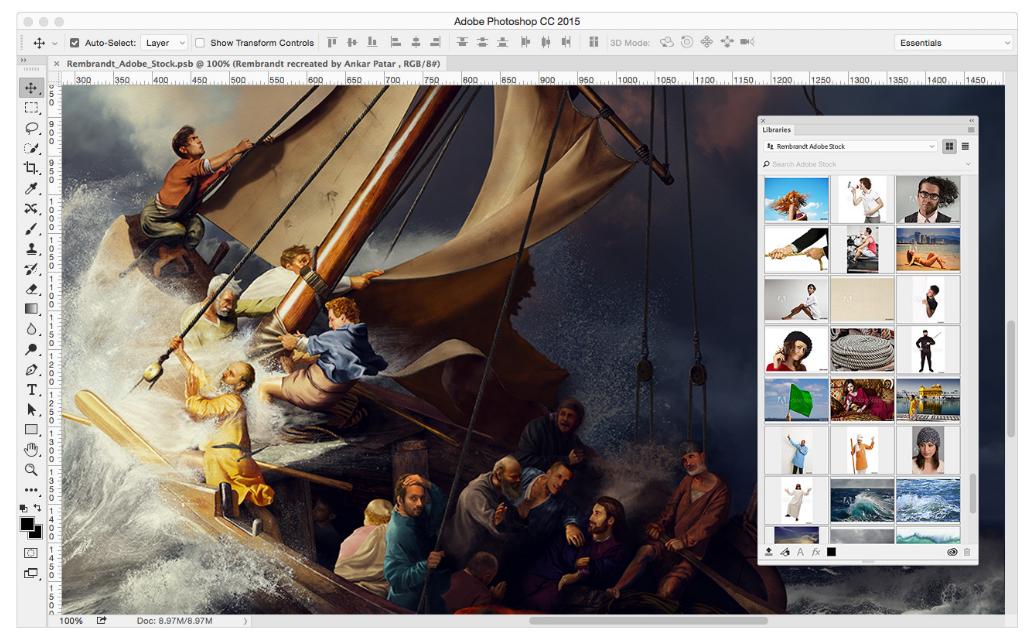
 The launch of Adobe Stock has shaken up the global stock image market. Approximately 85% of that market uses Adobe tools as their primary photo-editing application and more than 90% of the sellers manage their works of art using the same tools. Based on the acquisition of one of the best stock content providers, it curated over 40 million and still increasing high-quality images, illustrations and vectors, which are deeply integrated with the latest releases of Creative Cloud software applications.