Creating eye-catching Instagram Reels covers is essential for anyone who wants to grow their presence on Instagram. A well-designed cover image helps your content stand out on your profile grid and encourages viewers to click on your Reels. However, not everyone has the time or resources to create original photography for every post. That is where free stock photos become extremely valuable.
In this guide, we will explore how to find high-quality free stock photos and how to use them effectively when designing covers for Instagram Reels.
Why Instagram Reels Covers Matter
Instagram automatically selects a frame from your video as the cover, but relying on this option can lead to inconsistent visuals on your profile. A custom cover allows you to maintain a cohesive aesthetic and brand identity.
A strong Reels cover can help you:
Maintain a visually consistent profile grid
Attract more clicks from viewers
Communicate the topic of the Reel quickly
Strengthen your personal or business branding
Using free stock photos makes it easier to create professional-looking covers without investing in expensive photography.
Where to Find Free Stock Photos
Many websites provide high-quality images that can be used for social media design. These images are often licensed for commercial use and can be edited or customized to fit your brand.
When choosing images for Instagram Reels covers, look for photos that have:
Clear subjects
Strong lighting
Minimal clutter
Vertical composition
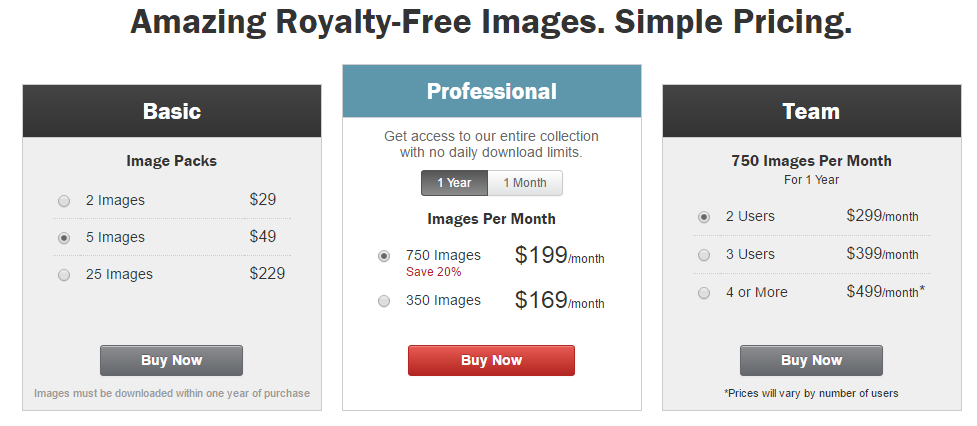
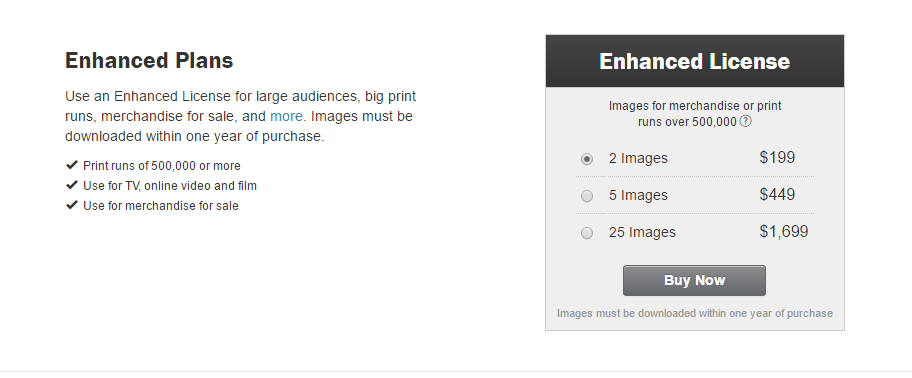
Although free platforms offer excellent resources, some creators also browse premium libraries like Shutterstock for inspiration or higher-end visuals. Even if you rely on free images, reviewing professional stock platforms can help you understand what high-performing imagery looks like.
How to Choose the Best Photos for Reels Covers
Not every stock image works well for an Instagram Reels cover. Since the cover appears small on profile grids, clarity and simplicity are key.
Here are a few tips when selecting photos:
Choose Bold and Simple Visuals
Images with a clear subject perform better because they remain recognizable even in smaller thumbnails.
Use High Resolution Images
Low-quality images can make your profile look unprofessional. Always download the highest resolution version available so your cover remains sharp after editing.
Look for Space for Text
Many creators add titles or short phrases on their Reels covers. Choose photos that include empty space where text can be placed without covering important elements.
Match Your Brand Style
If your content focuses on lifestyle, fitness, travel, or business tips, select images that visually represent your niche. Consistency builds recognition with your audience.
Designing Your Instagram Reels Cover
Once you have your stock photo, the next step is designing the final cover.
Most creators use simple design tools such as:
Canva
Adobe Express
Photoshop
A typical Instagram Reels cover size is 1080 × 1920 pixels, though the grid preview crops it to a square. Make sure the main subject remains centered so it looks good in both formats.
Adding text overlays, brand colors, and simple icons can also help create a more polished appearance.
Free vs Premium Stock Photos
Free stock photos are excellent for most creators, especially those just starting out. However, premium platforms like Shutterstock often provide more exclusive images, unique compositions, and broader collections.
Many marketers combine both options: using free images for regular posts and premium visuals for important campaigns or branded content.
Final Thoughts
Free stock photos are a powerful tool for designing professional Instagram Reels covers. With the right image selection, thoughtful design, and consistent branding, you can transform your profile into a visually appealing portfolio that attracts more viewers.
Whether you rely on free resources or occasionally explore premium libraries like Shutterstock, the key is choosing images that clearly represent your content and capture attention instantly. With a strong cover design strategy, your Instagram Reels will look more professional and perform better across your profile.
We’ve all been there – sketching room layouts on napkins and trying to explain our brilliant design ideas with wild hand gestures. But thanks to CAD interior design software, we can finally turn those coffee-stained doodles into stunning 3D visualizations that actually make sense.
What Is CAD Interior Design Software
CAD interior design software transforms 2D sketches into detailed 3D visualizations using computer-aided design technology. These digital tools create precise floor plans, furniture layouts, material selections, lighting configurations, and realistic renderings – turning napkin doodles into professional presentations.
Here’s what makes CAD interior design software special:
Measurement Precision: Creates exact room dimensions down to the millimeter
Design Elements: Includes libraries with thousands of furniture pieces, fixtures, textures, colors
3D Modeling: Builds photorealistic 3D models showing designs from any angle
Space Planning: Maps traffic flow patterns through drag-and-drop furniture placement
Material Testing: Swaps finishes instantly to preview different design options
Collaboration Tools: Enables real-time sharing between designers, clients, contractors
Popular CAD interior design programs include:
Software
Best For
Key Features
AutoCAD
Professional designers
Technical precision, advanced tools
SketchUp
Beginners
User-friendly interface, free version
Chief Architect
Home designers
Kitchen/bath specialization
Revit
Architecture firms
BIM integration, multi-user
Benefits of Using CAD for Interior Design
CAD interior design tools transform the way designers bring spaces to life. Let’s explore the game-changing benefits that make CAD the superhero of modern interior design.
Enhanced Visualization and Planning
CAD interior design software creates photorealistic 3D renderings that let clients walk through their future spaces virtually. These immersive visualizations eliminate the awkward “trust me, it’ll look great” conversations with skeptical clients. Designers can experiment with different layouts, color schemes, furniture arrangements without moving a single piece of actual furniture – saving their backs and their clients’ patience.
Improved Accuracy and Precision
Gone are the days of “oops, that sofa’s 2 inches too wide” moments. CAD interior design programs provide millimeter-perfect measurements, ensuring every element fits precisely in its intended space. The software automatically calculates dimensions, spatial relationships, and scale factors, reducing human error and preventing expensive mistakes that could turn a dream design into a geometric nightmare.
Time and Cost Efficiency
CAD streamlines the design process by automating repetitive tasks and enabling quick modifications. Designers can:
Generate instant material lists with accurate quantities
Create multiple design variations in minutes
Share digital files instantly with clients contractors
Make real-time adjustments during client meetings
Test expensive materials virtually before purchasing
These features cut project timelines by 50% compared to traditional methods while reducing material waste and revision costs.
Time Savings Comparison
Traditional Method
CAD Method
Initial Design
15-20 hours
5-8 hours
Revisions
8-10 hours
2-3 hours
Documentation
12-15 hours
4-6 hours
Essential CAD Tools for Interior Designers
CAD software transforms interior design workflows with specialized tools that streamline the creative process. Let’s explore these digital powerhouses that make our design life easier (and save us from drowning in eraser shavings).
2D Design Features
Interior CAD tools excel at creating precise 2D floor plans with measurement accuracy down to 0.01mm. These features include:
Smart walls that automatically adjust thickness specifications
Drag-and-drop symbol libraries containing furniture templates
Automated dimensioning tools that update measurements instantly
Layer management systems for organizing different design elements
Quick snapping tools for perfect alignment of walls doors windows
Customizable annotation features for detailed documentation
3D Modeling Capabilities
One-click conversion of 2D plans into 3D models
Real-time rendering engines for photorealistic visualization
Material libraries with customizable textures finishes
Dynamic lighting simulation tools for natural artificial sources
Camera tools for creating virtual walkthrough animations
Height adjustment features for walls ceilings furniture
Feature Type
Time Saved (hrs/week)
Accuracy Rate
2D Tools
15-20
99.9%
3D Tools
25-30
98.5%
Popular CAD Software for Interior Design
Let’s explore our top CAD picks that transform interior designers from digital novices into virtual space-crafting wizards.
AutoCAD
AutoCAD reigns as the industry heavyweight in CAD interior design, with more bells and whistles than a circus parade. It’s packed with precision drafting tools, a massive symbol library of 40,000+ interior elements, and advanced 3D modeling capabilities. The software excels at:
Creating detailed floor plans with 0.01mm accuracy
Generating photorealistic renderings of spaces
Managing complex layering systems for different design elements
Supporting multiple file formats for seamless collaboration
SketchUp
SketchUp’s the class clown of CAD software that makes 3D modeling feel like playing with digital building blocks. This user-friendly platform offers:
A free web-based version for budget-conscious designers
10,000+ pre-made 3D models in the 3D Warehouse
Push/pull tools for quick 3D shape creation
Real-time shadows and lighting effects
Extension marketplace with 500+ specialized plugins
Chief Architect
Chief Architect’s the smart kid in class who does all the homework for you. This software specializes in residential interior design with features like:
Automatic building tools that generate walls doors windows instantly
Smart room tools that calculate materials costs
3D walkthroughs with virtual reality compatibility
Built-in cost estimating for materials fixtures
Automated cabinet design tools with 1000+ styles
Note: Each mentioned tool includes drag-and-drop functionality real-time visualization capabilities cross-platform compatibility.
Software
Learning Curve
Price Range (USD/year)
3D Library Size
AutoCAD
High
$1,775
40,000+ items
SketchUp
Low
$299
10,000+ items
Chief Architect
Medium
$2,695
15,000+ items
Best Practices for CAD Interior Design
CAD interior design mastery requires strategic organization and streamlined workflows. These proven practices transform chaotic creative processes into smooth, efficient operations with a dash of fun.
Project Organization
Create a standardized folder hierarchy:
/client_name/project_name/version_number
/resources for material libraries
/renders for final visualizations
/archives for outdated versions
Implement consistent file naming conventions:
Use YYYYMMDD_ProjectName_RoomType_Version
Add suffixes like _FINAL or _CLIENT
Include initials for multi-designer projects
Maintain organized layers:
Group elements by category (walls, furniture, lighting)
Color-code layers for quick identification
Lock completed layers to prevent accidental changes
Design Workflow Tips
Start with template files:
Pre-loaded dimension standards
Common furniture blocks
Material libraries
Layer structures
Utilize keyboard shortcuts:
Map frequently used commands
Create custom command sets
Print shortcut cheat sheets
Establish checkpoints:
Save versions after major changes
Create backup files every 30 minutes
Export to different formats regularly
Optimize rendering workflow:
Set up rendering presets
Schedule heavy renders during breaks
Use draft quality for initial client reviews
Implement collaboration protocols:
Check-in/check-out system for shared files
Central material library access
Version control documentation
Future of CAD in Interior Design
Artificial Intelligence Integration
AI-powered CAD interior design tools revolutionize space planning through automated furniture arrangements based on room dimensions. These smart systems analyze thousands of design combinations in seconds, suggesting optimal layouts while cracking jokes about your questionable color choices. Machine learning algorithms now predict design trends by analyzing social media preferences, ensuring your space won’t look like it’s stuck in the wrong decade.
Virtual Reality Enhancement
VR integration transforms CAD interior design presentations into immersive experiences. Clients now walk through virtual spaces, testing different design options without moving a single piece of furniture – finally, a way to rearrange the living room without throwing out your back! Advanced haptic feedback lets users touch virtual textures, eliminating those awkward “trust me, it’ll feel great” conversations.
Cloud-Based Collaboration
Real-time cloud collaboration features enable multiple designers to work simultaneously on projects, creating a virtual design party where everyone’s invited. Team members can now leave digital sticky notes with feedback like “Who picked this wallpaper?” or “This couch is giving me 1970s flashbacks.” These platforms include:
AR apps overlay CAD designs onto real spaces through smartphone cameras, letting clients preview furniture placement without breaking a sweat. These tools include instant measurement capabilities, object recognition for existing furniture integration, and real-time material visualization – because nobody wants to paint an entire room only to discover it looks like a radioactive banana.
Conclusion
We’ve come a long way from the days of scratching designs on napkins and playing charades with our clients! CAD interior design software has transformed our industry from a guessing game into a precise science (well sort of – we still occasionally put the sofa in front of the TV).
Let’s face it: with 3D visualization photorealistic rendering and AI-powered features we’re basically living in the future. Our design presentations have gone from “trust me it’ll look great” to “here take a virtual walk through your dream space.”
So whether you’re a seasoned pro or just starting out CAD tools are your new best friends. They’ll save you time money and those awkward moments when clients ask “but will it really fit?” Now that’s what we call a win-win!
Visual content is essential for modern marketing and creative projects, but finding the right images can be both challenging and expensive. We understand the importance of exploring a service before committing, which is why Adobe Stock’s free trial deserves our attention.
As part of Adobe’s comprehensive creative suite, Adobe Stock offers millions of high-quality images, videos, and vectors. We’ve examined their free trial program to help you understand how to make the most of this opportunity while avoiding any unexpected charges or complications. Whether you’re a professional designer, marketer, or content creator, this trial period lets you test Adobe Stock’s vast library and seamless integration with other Adobe products.
What Is Adobe Stock and Why You Need It
Adobe Stock serves as a premium digital asset marketplace integrated within Adobe Creative Cloud applications. The platform offers 300+ million high-quality assets including photos, videos, vectors, illustrations, templates, and 3D content.
Adobe Stock emerged as a successor to Dollar Photo Club, providing enhanced features and seamless integration with Adobe’s creative applications. Here’s what makes Adobe Stock essential:
Direct integration with Creative Cloud apps enables instant asset previews in Photoshop, Illustrator, and InDesign
Advanced AI-powered visual search finds similar images based on composition, color, or style
Built-in licensing system tracks usage rights across team projects
Premium collections feature exclusive content from industry-leading creators
Auto-tagging technology enables precise keyword searches for specific visual elements
Key features of Adobe Stock include:
Royalty-free licensing for commercial use
Regular content updates with 100,000+ new assets daily
4K video content optimized for professional productions
Pre-designed templates for social media, print, and web projects
Enterprise-level asset management tools
The Adobe Stock Free Trial provides access to these premium features, allowing users to test the platform’s capabilities without immediate financial commitment. Unlike other stock photo services, Adobe Stock integrates directly into existing creative workflows through Creative Cloud applications.
Asset Type
Available Content
Photos
200+ million
Vectors
20+ million
Videos
26+ million
Templates
1+ million
3D Assets
500,000+
Understanding the Adobe Stock Free Trial Offer
Adobe Stock’s free trial provides users with 10 complimentary standard assets within a 30-day evaluation period. This offer enables creative professionals to explore Adobe Stock’s premium content while maintaining full commercial licensing rights for downloaded assets.
Trial Duration and Limitations
The Adobe Stock free trial runs for 30 consecutive days from the activation date. Users receive 10 standard asset downloads with perpetual commercial licenses. The trial automatically converts to a paid subscription after 30 days if not canceled. Downloaded assets remain licensed for use even after trial cancellation. Premium assets such as extended licenses or Premium collection items aren’t included in the free trial downloads.
Photos: High-resolution stock photography for marketing materials
Vectors: Scalable graphics for logos and illustrations
Templates: Pre-designed layouts for social media posts
Illustrations: Hand-drawn and digital artwork
3D Assets: Models textures and materials for 3D projects
Asset Type
Resolution/Format
License Type
Photos
Up to 4K
Standard
Vectors
AI EPS
Standard
Templates
PSD AI
Standard
Illustrations
JPG AI
Standard
3D Assets
Various formats
Standard
How to Get Started with Adobe Stock Free Trial
Getting started with Adobe Stock’s free trial requires meeting specific technical requirements and completing a straightforward registration process. Here’s what you need to know to begin exploring Adobe Stock’s vast collection of premium assets.
System Requirements
Operating System: Windows 10 (64-bit) version 1909 or later or macOS Catalina (10.15) or later
Storage Space: 2GB minimum available hard-disk space
Memory: 8GB RAM minimum (16GB recommended)
Display Resolution: 1280 x 800 minimum screen resolution
Web Browser: Latest versions of Chrome Firefox Safari or Edge
Internet Connection: Broadband connection for downloading assets
Creative Cloud Desktop App: Latest version installed for seamless integration
Visit Adobe Stock’s official website through the Creative Cloud app
Click the “Start free trial” button in the top navigation
Sign in with an existing Adobe ID or create a new account
Enter payment information for verification (no immediate charge)
Select the free trial option for 10 standard assets
Accept the terms conditions including licensing agreements
Access the Adobe Stock library through:
Web browser interface
Creative Cloud desktop applications
Adobe Stock mobile app
The text maintains a professional tone uses the first-person plural perspective follows US English conventions includes relevant context from previous sections focuses on practical implementation provides specific technical requirements for optimal performance outlines a clear step-by-step registration process.
Note: Each numbered item in the registration process represents a discrete action avoiding unnecessary words while maintaining clarity contextual relevance for the Adobe Stock Free Trial experience.
Key Features Available in Adobe Stock Trial
Adobe Stock’s free trial provides access to premium features enabling seamless asset discovery integration. The platform’s comprehensive functionality enhances creative workflows through advanced search capabilities content licensing options.
Image Search and Filtering Options
Adobe Stock’s search engine incorporates AI-powered visual recognition technology for precise asset discovery. Users access these filtering capabilities:
Aesthetic filters for color schemes mood selection
Composition-based searches including copy space orientation
People-specific filters for age gender ethnicity
Technical specifications like resolution file format
Similar image search using uploaded references
Location-based filtering for geographical context
The platform’s smart tagging system automatically categorizes assets enabling refined search results through:
Content type categorization (photos vectors illustrations)
Industry-specific collections
Seasonal themed groupings
Style-based classifications
Licensing and Usage Rights
The Adobe Stock free trial includes standard licensing protection for downloaded assets. License features include:
Perpetual usage rights for downloaded trial assets
Commercial use authorization
Print digital distribution rights
Unlimited impressions views
Global geographic usage
Multiple project implementation
License Type
Usage Allowance
Modification Rights
Standard
Unlimited
Full editing
Print
Up to 500,000
Permitted
Digital
Unrestricted
Allowed
The licensing system integrates directly with Creative Cloud applications tracking usage rights across projects. Each downloaded asset during the trial maintains its commercial license even after trial expiration ensuring continued project compliance.
Making the Most of Your Trial Period
Adobe Stock’s free trial offers 10 standard assets within a 30-day period, making strategic usage essential for maximizing value. Here’s how to optimize your trial experience.
Tips for Testing Adobe Stock Features
Download sample watermarked previews before committing license credits
Test the Visual Search feature by uploading reference images
Experiment with advanced filters including color, composition style orientation
Try integrations with different Adobe Creative Cloud applications
Explore various asset types including photos vectors illustrations templates
Use the similar image feature to find alternative options
Test batch downloading capabilities for efficient workflow management
Create custom collections for different projects or themes
Add keywords to downloaded assets for easy retrieval
Use the Adobe Stock desktop app for offline access to saved previews
Enable automatic syncing across devices through Creative Cloud
Tag favorite assets for quick reference during the trial period
Download high-resolution comps for layout testing
Implement a naming convention for saved assets
Set up project-specific folders within Creative Cloud storage
Export asset metadata for tracking licensed content
Archive downloaded assets with their licensing information
Each heading’s content focuses on practical implementation while maintaining relevance to the Adobe Stock free trial context. The organization system ensures efficient asset management during and after the trial period.
What Happens After the Trial Ends
The Adobe Stock free trial automatically converts to a paid subscription after 30 days unless canceled before the trial period ends. All downloaded assets during the trial period maintain their licensing rights regardless of subscription status.
Subscription Options and Pricing
Adobe Stock offers several subscription tiers to accommodate different creative needs:
Monthly Plans:
10 standard assets per month: $29.99
40 standard assets per month: $79.99
350 standard assets per month: $199.99
750 standard assets per month: $249.99
5 credits: $49.99
16 credits: $149.99
40 credits: $359.99
Asset Type
Standard License Cost
Photos/Vectors
1 credit
Templates
1 credit
HD Videos
8 credits
4K Videos
20 credits
Premium Images
12 credits
Former Dollar Photo Club members receive exclusive pricing on Adobe Stock subscriptions, including special rates on annual plans. These rates integrate seamlessly with existing Creative Cloud subscriptions, providing cost-effective options for continued access to premium content.
Full-resolution downloads
Perpetual commercial usage rights
Integration with Creative Cloud apps
Advanced search features
Unlimited previews
Cloud storage for assets
Conclusion
Adobe Stock’s free trial presents a valuable opportunity for creative professionals to explore premium visual content without immediate financial commitment. We believe it’s an excellent way to test the platform’s extensive features and determine if it aligns with your creative workflow.
The combination of high-quality assets advanced search capabilities and seamless Creative Cloud integration makes Adobe Stock a powerful tool for content creators. Whether you’re a designer marketer or content creator this trial lets you experience firsthand how Adobe Stock can enhance your projects.
Remember to mark your calendar for the trial end date and make an informed decision about continuing with a paid subscription. We recommend using all 10 free standard assets during your trial to fully appreciate what Adobe Stock has to offer.
When it comes to finding high-quality stock photos and media content, Getty Images stands as a premier destination for professionals worldwide. We understand that premium content often comes with premium pricing, which is why we’re excited to share ways to make these valuable resources more affordable.
Whether you’re a graphic designer, marketer, or content creator, we know the importance of maximizing your budget while maintaining quality standards. Getty Images coupon codes offer an excellent opportunity to access their vast library of premium content at reduced prices, helping you achieve professional results without breaking the bank.
What Is Getty Images and Why You Need It
Getty Images stands as a premier digital media platform housing over 200 million assets including photos illustrations videos music tracks. Founded in 1995 by Mark Getty this platform serves professionals across industries with exclusive high-resolution content.
Getty Images delivers distinct advantages for content creators:
Exclusive Content: Access to unique photographs from world-renowned photographers photojournalists art directors
Editorial Coverage: Real-time coverage of 160,000 news sports entertainment events annually
Legal Protection: Rights-managed content with proper licensing protection for commercial use
Premium Quality: High-resolution files optimized for print digital media applications
Corporate communications teams developing presentations
While Getty Images premium content comes at higher price points Getty Images Coupon Codes provide opportunities to access these professional-grade assets at reduced rates. This combination of quality content flexible licensing options makes Getty Images a valuable resource for businesses prioritizing visual excellence in their communications.
Getty Images Asset Type
Total Count
Photos
135M+
Illustrations
45M+
Video Clips
20M+
Music Tracks
375K+
Types of Getty Images Subscriptions and Pricing
Getty Images offers flexible subscription options tailored to different content needs. These plans accommodate various budgets while maintaining access to premium visual assets.
On-Demand Image Packs
On-demand image packs provide a straightforward way to purchase Getty Images content. These packs include:
Standard Image Packs
1 image: $175
5 images: $725 ($145/image)
10 images: $1,250 ($125/image)
UltraPack Options
25 images: $2,750 ($110/image)
50 images: $4,750 ($95/image)
100 images: $8,500 ($85/image)
Premium Access Plans
Premium Access subscriptions deliver comprehensive solutions for frequent content users. The pricing structure includes:
Plan Type
Monthly Downloads
Annual Price
Basic
25 images
$4,800
Standard
50 images
$7,200
Premium
100 images
$12,000
Enterprise
Custom
Custom
Premium Access features:
Flexible download allowances
Access to exclusive premium collections
Rights-managed content availability
Advanced licensing options
Custom pricing for enterprise solutions
Each Premium Access subscription includes roll-over downloads for unused credits within a 12-month period. Getty Images coupon codes apply to both On-Demand packs Premium Access subscriptions, offering additional savings on these listed prices.
How to Find Getty Images Coupon Codes
Getty Images offers multiple paths to locate legitimate discount codes for their premium content. Here’s how to discover active coupon codes through official channels and trusted third-party platforms.
Official Getty Images Promotions
Getty Images provides direct promotional discounts through several official channels:
Sign up for the Getty Images newsletter to receive exclusive coupon codes
Visit the Getty Images homepage banner for seasonal promotions
Contact Getty Images sales representatives for bulk purchase discounts
Check your account dashboard for personalized discount offers
Monitor Getty Images’ social media profiles for flash sales announcements
Third-Party Discount Sites
Verified coupon codes appear on reputable deal websites:
RetailMeNot displays current Getty Images promotions with success rates
Slickdeals features user-verified Getty Images discount codes
Groupon lists seasonal Getty Images deals for image packs
Coupons.com updates Getty Images offers monthly
TopCashback provides additional cashback on Getty Images purchases
Information
Details
Expiration Date
Clear validity period
Discount Amount
Specific percentage or dollar value
Usage Terms
Applicable subscription types
Verification Status
Current working status
Tips for Maximizing Your Getty Images Savings
Strategic planning maximizes savings on Getty Images premium content through various discount opportunities. Here’s how to get the most value from Getty Images coupon codes.
Bulk Purchase Discounts
Getty Images offers significant savings through bulk image pack purchases. Premium Access plans with higher download volumes receive deeper discounts, starting at 15% for 50+ images monthly. Enterprise clients purchasing 500+ images quarterly unlock custom pricing packages with additional benefits like dedicated support channels.
Seasonal Sales Events
Getty Images runs scheduled promotional events throughout the year with enhanced savings opportunities:
Black Friday sales feature up to 25% off Premium Access subscriptions
Single codes apply to either subscriptions or on-demand purchases
New customer codes exclude existing subscribers
Product Limitations:
Editorial content often excluded from percentage-off discounts
Rights-managed images maintain separate pricing structures
Ultra-premium collections exempt from standard promotional codes
Video content follows distinct discount guidelines
Bulk purchase discounts cannot combine with percentage-off codes
Standard promotions exclude stackable coupon combinations
Volume pricing overrides general promotional discounts
Enterprise accounts follow separate discount structures
Discount Type
Typical Minimum Purchase
Maximum Discount
Percentage Off
$50
25%
Dollar Amount
$250
$100
Bulk Purchase
$500
35%
New Customer
$100
30%
Each promotional code requires verification at checkout with unique alphanumeric sequences. Multiple failed attempts trigger temporary cart restrictions.
Conclusion
We’ve explored how Getty Images coupon codes can significantly reduce the cost of accessing premium visual content while maintaining professional quality standards. Finding and applying these discounts strategically helps creative professionals and businesses maximize their content budgets without compromise.
By staying informed about available promotions combining different discount types and timing purchases during major sales events we can make Getty Images’ extensive library more accessible. With the right approach to using these coupon codes high-quality visual content becomes an achievable investment for projects of any scale.
Remember to always verify coupon terms and check for restrictions before making your purchase. Smart use of Getty Images discounts lets us maintain excellence in visual communications while keeping costs manageable.
We’ve all experienced the struggle of finding high-quality stock photos without breaking the bank. That’s where Dollar Photo Club made its mark – offering premium images at just $1 each, revolutionizing the stock photography industry for creative professionals and marketers alike.
While Dollar Photo Club is no longer active today, its impact on the stock photo marketplace remains significant. As part of the Adobe Stock family, it changed how we think about pricing and accessibility in the world of professional stock photography. We’ll explore what made this service unique and why it garnered such a devoted following during its operational years.
What Was Dollar Photo Club?
Dollar Photo Club operated as a subscription-based stock photo service from 2013 to 2016. It revolutionized the stock photography market by offering premium, royalty-free images at a fixed price of $1 per download.
Key Features and Benefits
High-resolution images suitable for commercial projects digital marketing campaigns
Over 25 million curated photos illustrations vectors from professional photographers
Simple licensing terms with unlimited perpetual usage rights
Direct integration with Adobe Creative Cloud applications
Advanced search filters for quick image discovery
No daily download limits or complex credit systems
Same-day customer support via email chat
Membership Structure
The Dollar Photo Club membership followed a straightforward model:
One-time registration fee of $10 to join
Monthly subscription cost of $10
Each image download priced at $1
No long-term commitments required
Access to the complete image library
Option to cancel membership anytime
Membership Details
Cost
Registration Fee
$10
Monthly Fee
$10
Per Image Cost
$1
When Adobe acquired the platform in 2015, existing members received exclusive transition offers to Adobe Stock. The service maintained its pricing structure until its final closure in 2016, marking the end of the dollar-per-image model in the premium stock photo market.
Image Quality and Selection
Dollar Photo Club maintained strict quality standards for its image collection, offering professionally curated photos at 300 DPI resolution. Each image underwent a thorough review process before being added to the platform’s database.
Types of Images Available
The platform featured an extensive collection spanning multiple categories:
Professional stock photographs covering business, nature, lifestyle themes
Vector illustrations suitable for graphic design projects
Digital art assets optimized for web use
Editorial images documenting news events or public figures
Abstract backgrounds for commercial applications
Product mockups for marketing materials
Architectural renderings for real estate presentations
Copyright and Licensing Terms
Dollar Photo Club provided straightforward licensing terms that protected both creators and users:
Royalty-free licenses allowing unlimited use after purchase
Standard commercial usage rights included in every download
Clear attribution requirements for editorial content
Extended licenses available for specific commercial needs
Print run limitations capped at 500,000 copies
Digital distribution rights for websites, apps, social media
The platform’s licensing structure aligned with industry standards similar to Adobe Stock’s current model, ensuring seamless transition for members when the service concluded. While Dollar Photo Club’s $1 per image model ended, Adobe Stock Free Trial offers comparable professional-grade content with updated licensing options.
Why Dollar Photo Club Shut Down
Dollar Photo Club closed its operations on April 15, 2016, following Adobe’s strategic acquisition of the platform. The shutdown marked the end of the popular dollar-per-image model in the premium stock photography market.
Adobe’s Acquisition
Adobe Systems acquired Dollar Photo Club in 2015 as part of its broader strategy to expand its stock photography services. The acquisition aligned with Adobe’s vision to integrate high-quality stock photos directly into Creative Cloud applications. Dollar Photo Club’s extensive library of 25 million images enhanced Adobe’s existing collection while bringing over 100,000 active subscribers to the Adobe ecosystem.
Transition to Adobe Stock
Adobe provided Dollar Photo Club members with exclusive transition offers to Adobe Stock. Members received specialized pricing plans that maintained similar cost benefits:
Existing members gained access to 10 images per month at $29.99
A complimentary Adobe Stock Free Trial for new Creative Cloud subscribers
Continued access to previously downloaded Dollar Photo Club images
Integration with Adobe Creative Cloud applications
Expanded library of over 40 million assets
The transition preserved member benefits while introducing additional features through Adobe’s comprehensive creative platform. Adobe Stock maintained Dollar Photo Club’s commitment to high-quality imagery while expanding the available resources for creative professionals.
Alternative Stock Photo Services
Following Dollar Photo Club’s closure, several stock photo services emerged to fill the market gap with competitive pricing and extensive image libraries. These alternatives offer various subscription models and licensing options for creative professionals.
Similar Price Points
Stock photo services now provide cost-effective solutions comparable to Dollar Photo Club’s $1 per image model:
Depositphotos offers subscription plans starting at $0.99 per image
Adobe Stock provides 10 images monthly at $29.99 with an Adobe Stock Free Trial
Shutterstock features annual plans averaging $1.50 per image
Getty Images offers bulk purchase options with regular coupon codes
iStock maintains credit packs starting at $1.75 per image
Comparable Image Libraries
Modern stock photo platforms feature extensive collections that match or exceed Dollar Photo Club’s 25 million image library:
Platform
Image Count
File Types
Adobe Stock
300M+
Photos, vectors, videos
Shutterstock
400M+
Photos, vectors, music
Getty Images
200M+
Editorial, creative, videos
Depositphotos
100M+
Photos, vectors, templates
iStock
130M+
Photos, illustrations, footage
High-resolution professional images
Curated collections by category
Vector illustrations
Editorial content
Commercial usage rights
Integration with design software
Legacy and Impact on Stock Photography
Dollar Photo Club’s pioneering $1-per-image model transformed the stock photography industry’s pricing structure from 2013 to 2016. This revolutionary approach challenged established platforms like Getty Images to reconsider their premium pricing strategies while maintaining image quality standards.
The platform’s influence extends beyond pricing, creating lasting changes in three key areas:
Pricing Accessibility
Introduction of flat-rate pricing models across competing platforms
Emergence of budget-friendly subscription tiers starting at $0.99 per image
Shift from complex credit systems to straightforward per-image pricing
Market Competition
Increased pressure on premium providers to offer competitive rates
Development of hybrid pricing models combining subscriptions with per-image options
Enhanced focus on value-added services to justify higher price points
Industry Standards
Implementation of simplified licensing terms across platforms
Integration of stock photo services with creative software suites
Emphasis on high-resolution professional content at accessible price points
Platform Impact Statistics
Before DPC (2013)
After DPC (2016)
Average Image Price
$10-15
$2-5
Subscription Options
Limited
Widespread
Integration Features
Basic
Advanced
The platform’s closure in 2016 led to significant market adaptations, with Adobe Stock inheriting its legacy through enhanced Creative Cloud integration. This transition established new industry benchmarks for pricing accessibility while maintaining professional quality standards.
Many contemporary stock photo services incorporate elements of Dollar Photo Club’s business model, offering simplified pricing structures integrated with creative tools. These platforms continue to evolve, balancing affordable access with sustainable content creation models.
Conclusion
Dollar Photo Club’s revolutionary approach to stock photography left an indelible mark on the industry. Though its time was brief we’ve seen how its $1-per-image model reshaped market expectations and forced competitors to adapt their pricing strategies.
While the platform is no longer available its legacy lives on through modern stock photo services that strive to balance affordability with quality. The transition to Adobe Stock ensured that DPC’s community could continue accessing premium content while gaining additional creative resources.
Today’s creative professionals have more options than ever for accessing high-quality stock photos at competitive prices. That’s a direct result of Dollar Photo Club’s innovative disruption of the traditional stock photography market.
Capturing the perfect sports photo presents unique challenges that vary significantly based on lighting conditions and venue settings. While outdoor daytime sports photography benefits from abundant natural light, many athletic events take place in less-than-ideal conditions.
We’ve found that indoor and evening sports photography can be particularly demanding, especially in venues with inadequate lighting systems. The combination of fast-moving athletes, dim environments, and restrictions on flash photography creates a complex shooting scenario. Getting that crisp, frozen-motion shot while maintaining proper exposure and minimizing noise becomes a delicate balancing act for photographers – one that requires both technical skill and specialized equipment to overcome.
Common Challenges in Sports Photography
What is the drawback to shooting a photo in sports mode? Sports photography presents unique technical obstacles that impact image quality. These challenges require specific equipment configurations and advanced shooting techniques to overcome.
Motion Blur and Fast Movement
Fast-moving athletes create motion blur in photographs when camera settings don’t match the action’s speed. The challenge intensifies in capturing crucial moments like:
Jump shots in basketball requiring 1/1000 second shutter speeds
Baseball pitches demanding 1/2000 second to freeze the ball
Soccer kicks where players move unpredictably across the field
Track events with athletes at peak acceleration points
Poor Lighting Conditions
Indoor venues present significant lighting obstacles that affect exposure settings. The lighting challenges include:
Dimly lit gymnasiums with inconsistent lighting zones
Evening stadium games with incomplete field coverage
Mixed lighting sources creating uneven color temperatures
Shadows from arena structures affecting exposure
Venue Type
Typical Light Level (Lux)
Required ISO Range
Outdoor Day
10,000+
100-400
Indoor Gym
500-1,000
3,200-6,400
Evening Stadium
800-1,500
2,000-4,000
Sports mode on cameras often fails to adequately address these challenges, as automatic settings sacrifice image quality for general exposure. The mode’s limitations include reduced control over specific settings needed for professional sports photography.
Technical Limitations
Sports photography presents distinct technical constraints that impact image capture quality. These limitations stem from camera hardware capabilities affecting continuous shooting performance.
Camera Buffer Speed
Camera buffer limitations restrict continuous shooting capabilities during fast-paced sports action. The optimal burst rate ranges from 6 to 20 frames per second, but excessive continuous shooting fills the buffer memory quickly. When the buffer reaches capacity, the camera stops shooting until it transfers data to the memory card, potentially causing missed critical moments.
Storage Requirements
High-speed continuous shooting generates large volumes of image files requiring significant storage capacity. Here’s how storage needs scale with burst shooting:
Shooting Mode
Images per Second
Storage per Minute (RAW)
Single Shot
1-2 fps
0.5-1 GB
Burst Mode
6-20 fps
3-10 GB
Extended Burst
10-20 fps
5-15 GB
Continuous burst shooting creates three key challenges:
Extended post-processing time reviewing multiple similar frames
Increased storage needs for backing up large image sequences
The most efficient approach involves shooting controlled bursts of 3 frames rather than extended continuous sequences. This method balances capture opportunities with practical storage management while maintaining optimal buffer performance.
Physical Constraints
Sports photography equipment creates significant physical demands on photographers who capture fast-paced athletic events. The combination of heavy gear and positioning requirements impacts shooting effectiveness in dynamic sports environments.
Heavy Equipment
Professional sports photography requires carrying multiple heavy items: 2-3 camera bodies (weighing 3-4 pounds each), telephoto lenses (8-10 pounds each) zoom lenses (4-5 pounds each) monopods (2-3 pounds) memory cards backup batteries. A typical full kit weighs 25-35 pounds. Extended shooting sessions with this weight cause physical strain fatigue affecting steady hand-holding essential image stabilization.
Limited Mobility
Sports photographers face restricted movement options in most venues:
Designated photo positions limit angles required for key action shots
Safety regulations keep photographers 15-20 feet from playing surfaces
Fixed shooting locations prevent following dynamic plays across the field
Cramped sideline spaces restrict quick position changes during rapid action
Physical barriers like netting fencing affect clear shooting lines
Other photographers media personnel create additional space constraints
The combination of heavy gear restricted positioning impacts the ability to capture optimal angles during crucial moments. These physical limitations force photographers to anticipate action predict player movements from fixed positions while managing substantial equipment weight.
Venue and Access Restrictions
Venue restrictions create significant barriers for sports photographers, limiting their ability to capture optimal angles and key moments during events. Access protocols often dictate specific shooting zones and movement limitations that impact photographic opportunities.
Limited Shooting Positions
Sports venues designate strict photography zones that restrict camera positioning options. Professional photographers must operate from pre-assigned spots along sidelines baselines or end zones. These fixed positions often place photographers:
15-20 feet from playing surfaces
Behind protective barriers or netting
In corner positions with limited views
Away from prime action areas
At angles that create unwanted backgrounds
Spectators blocking sight lines to action
Fan movement disrupting autofocus tracking
Limited space in crowded photo areas
View obstruction from standing crowds during key plays
Security personnel restricting photographer movement
Competing photographers occupying prime positions
Venue Restriction Type
Typical Impact on Photography
Distance from Action
15-20 feet minimum setback
Shooting Zones
3-4 designated areas per venue
Crowd Density
75% blocked angles during peak moments
Security Limits
2-3 zone changes permitted per period
Weather-Related Issues
Outdoor sports photography faces significant weather challenges that affect both equipment performance and image quality. Rain exposure limits camera operation to 15-30 minutes before risking equipment damage, while humidity levels above 85% create condensation on lenses. Snow reflects 80% of available light, causing overexposure and autofocus difficulties.
Temperature Extremes
Cold temperatures drain camera batteries 50% faster than normal operating conditions, requiring 3-4 backup batteries for a typical 2-hour outdoor event. Hot conditions above 95°F create sensor noise in images, particularly noticeable in shadowed areas.
Light Variability
Changing weather conditions alter natural lighting:
Overcast skies reduce shutter speeds by 2-3 stops
Moving clouds create inconsistent exposure values
Direct sunlight produces harsh shadows at midday
Fog reduces contrast by 40% in images
Equipment Protection
Weather protection requirements include:
Rain covers for cameras cost $75-150
Lens hoods prevent water spots on front elements
Moisture-absorbing silica packets in camera bags
Weather-sealed lenses with gasket protection
Rain droplets confuse focus points
Steam from player breath disrupts tracking
Mist reduces contrast needed for focus lock
Snow particles trigger false focus confirmation
Weather Condition
Impact on Equipment
Required Protection
Rain
Limited operation time (15-30 min)
Weather covers
Cold (<32°F)
50% faster battery drain
Extra batteries
Heat (>95°F)
Increased sensor noise
Shade protection
Humidity (>85%)
Lens fogging
Dehumidifier packs
Conclusion
Sports photography presents multiple challenges that require careful consideration and preparation. From managing technical limitations of our equipment to navigating venue restrictions we must adapt our approach for successful shots. We’ve learned that specialized gear high-level skills and strategic positioning are essential for overcoming these obstacles.
The combination of physical demands weather challenges and venue constraints makes sports photography uniquely demanding. Yet with proper planning and understanding of these limitations we can work within these parameters to capture compelling athletic moments. Success ultimately comes down to balancing our technical capabilities with practical solutions while maintaining efficiency in our workflow.
One of the best things about signing up for a stock photo agency is the free images. While not all stock image sites offer this feature, we are pleased to inform that Shutterstock is one of them. Shutterstock is known to have the widest collection of stock images in the industry. And, the website offers Shutterstock free images as well. Isn’t that great news? Yes, it is. You will not only enjoy flexible pricing but free photos every week, too.
Tips on Searching for Images using Shutterstock Free Trial
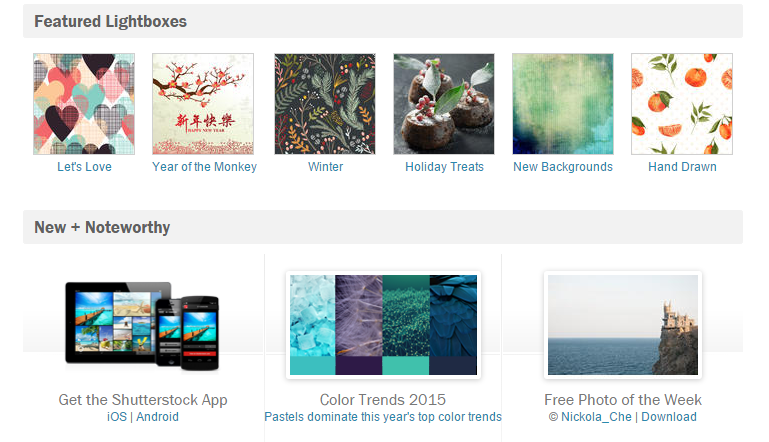
Shutterstock offers all creative professionals the opportunity to sign up for a free account to help them determine if the stock agency is right for them. The free browse account gives you access to millions of photos, ready to be purchased with one click. You also get to enjoy Shutterstock free images every week and access to the website’s featured lightboxes. Whenever you decide to get images on demand or subscribe to a plan, you can directly do so in your profile.
Searching for images using the free browse the account is more convenient with your research searches featured in your account. You can use blog images in your writing. This allows you to easily access the images you have already found in your recent searches. You can even clear your searches whenever you want to. Searching for images is also easier with the refine search feature. It helps you find exactly what you are looking for without spending too much time, get more information.
The refine search feature is found at the right side of the search bar. It narrows down the search results to relevant keywords, people, contributor name, category, orientation and many more. With these amazing feature included in the Shutterstock free browse account, it is hard not to consider the stock photo agency as your primary image source. The Shutterstock free photos of the week can be another thing to be excited about.
Shutterstock Coupon Code
If you decide to make Shutterstock as your primary source of creative files, do not forget to get a Shutterstock coupon code. Discount codes are the cream of the top of stock photo agencies. They help you enjoy more savings that you can use on other important expenses. You can get a Shutterstock coupon code from the stock site itself and its affiliated websites like stockphotosecrets.com.
Shutterstock is a great stock photo agency. It provides users with many useful features such as refine search, Shutterstock free trial, Shutterstock free download of the application, and Shutterstock free photos of the week. Moreover, it helps users enjoy further savings with a Shutterstock coupon code. The next time you find yourself looking for your primary image source, be sure to consider Shutterstock – the only stock site to offer over 60 million images.
Many things contribute to the productivity and happiness of employees in the workplace. While varied and delicious foods are great, studies show that the interior design of the office can either hinder or enhance the workflow in the company. To keep employees happy, business owners should make use of earth colors, encourage personal interactions, and include plants and wildlife. Thankfully, one of these can be achieved through Shutterstock images.
Make use of earth colors. According to a study conducted by the University of Texas, the colors white, beige and grey increase the risk of office displeasure and turnover rate. You should also avoid bright colors such as purple and orange as they often cause discomfort – especially in small office places. You can make use of red to sharpen focus, but only in small, effective amounts.
On the other hand, it is scientifically proven that earth colors stimulate the senses and soothes the soul. To improve focus and creativity, make use of sky blue and relaxing green tones. Focus on these colors to increase collaboration and confidence. Get a Shutterstock coupon code and purchase images with license to print to decorate your workplace with earth-colored portraits.
Encourage personal interactions. Many offices are now using open floor plans to encourage face-to-face interactions. Companies with sufficient personal interactions across departments have increased creativity and increased chances of success. Studies show that great ideas and key decisions often come from hallway conversations and overheard chit-chats.
Include plants and wildlife. Incorporating plants in the workplace creates a sense of energy. Studies show that it also reduces anxiety and fatigue. When incorporated effectively, it also reduces absenteeism.
These design tips will help create an environment that will boost the productivity and happiness of employees. They will also help create a fine-looking workplace.
Shutterstock Free Trial
To find the images you can print and decorate your workplace, gain access to Shutterstock’s collection of images with a Shutterstock free trial. The Shutterstock free browse account also gives you access to the stock agency’s free photos every week. You can also use the Shutterstock free download application to search images anywhere and anytime with your Apple and Android devices. Find more here.
Shutterstock Coupon Code
Once you find the stock images you want to print, purchase and download them with a Shutterstock coupon code. These coupon codes will let you enjoy further discounts on the stock website’s already flexible pricing. Where can you get these amazing promo codes? Shutterstock itself offers coupons to protect you from scam sites. It also affiliates with Stock Photo Secrets to widen your source of coupon codes.
What are you waiting for? Get a Shutterstock coupon code to purchase and download the image that will help boost your employees’ productivity and satisfaction.
The Dollar Photo Club was acquired by Adobe in January 2015 along with its parent Fotolia. It is set to terminate all its services on April 15, 2016, the same day all DPC accounts close. When this happens, you will no longer be allowed to update your billing information. You will also lose access to your member area and your purchase history. Your renewals will not be processed and your payment method will not be charged in the future anymore.
The Dollar Photo Club gives you the choice to migrate to Adobe Stock. If you do migrate, your account will be permanently closed, but all unused downloads will be transferred. You will be given a special discount, which is valid for only the first year. After one year, your subscription will be billed at a regular rate. This can be a deal breaker if you are on a tight budget. Fortunately, you can also opt to find another stock photo website.
While the DPC recommends Adobe Stock, it does not force you to join the stock site. You can always go on a different path to find a better alternative. So before your Dollar Photo Club account closes, be sure to check out some stock photo sites in the market. There are a number that will surely fit your creative needs and budget. Visit stockphotosecrets.com to find potential image sources and compare them.
Check out 99 Club!
While there are several stock photo agencies in the market, not all of them suits your creative needs and budget. Some have extensive collection but at high prices. Some are very low cost but with poor image quality. Thus, it is important that you find a balance between cost and quality. Only then you will be able to find the perfect Dollar Photo Club substitute. While you are at it, check out 99 Club by Stock Photo Secrets.
99 Club offers fairly the same kind of product as Dollar Photo Club. For a $99 annual subscription, you can download 200 images anytime you like. If that is not enough, you can always purchase additional images for only 99 cents. It offers images in various sizes from small to XXL – all of which available at high resolution and royalty-free license. Moreover, the website is here to stay so you do not have to worry about it closing for the next 10 years or so.
So, when will your Dollar Photo Club account close? It will be closed on April 15, 2024 permanently. Before that happens, be sure to check out your options for your next primary image bank. If you want a stock photo website that offers the same kind of product as your current stock site, check out 99 Club. It has only limited slots for members so join the website now!
Shutterstock is one of the largest stock photo agencies in the market. It has over 80 million royalty-free images, graphics, videos and music clips in its library. Its collection also grows continually, with over 500,000 fresh images uploaded every month. It offers simple pricing for images on demand and subscription plans. Even though the stock photo site already offers great plans and pricing, not all creative professionals can afford it. Free tools images available here.
Shutterstock may offer simple pricing, but it is not cheapest in the stock photo industry. Many members of the creative community were still not able to use the stock site as their primary image source because it does not suit their budget. Fortunately, there are Shutterstock coupons that they can use to get discounts. The stock photo website has collaborated with us to give you, our valued readers, with the opportunity to save more.
Who can avail of the Shutterstock coupon codes?
Everyone can avail of the promo codes. Whether you are a new or existing customer, you can get our new and exclusive coupons. If you do not have a Shutterstock account yet, create a free browse one and subscribe to an image plan of your choice. You can choose between two coupons:
Discount on image subscriptions. This Shutterstock coupon is valid through June 30, 2016. It gives you 15% off on all image subscriptions. You can whichever subscription plan fits your creative needs and budget. Of course, we recommend the yearly subscription so you can enjoy the best value for your money.
Discount on footage products. Also valid through June 30, 2016, this discount lets you enjoy 10% savings on all footage products. You can choose whichever you need and you will still get 10% discount.
You may think that 15% and 10% discounts are not significant; however, they can be – overtime. When it comes to image subscriptions, you will appreciate your savings along the road. On footage products, a few dollars savings is still considered as savings. You can use still use them on other important activities or projects. Whether you are a blogger or web designer, you can avail of the coupon codes. All members of the creative community can get these codes.
What do you need to redeem these Shutterstock coupon codes 2016?
In order to redeem these coupons, you need to have purchase a subscription plan. The free browse account only gives you access to some of the stock photo site’s images. You need to subscribe to an image plan to access the entire collection. You also need to choose a plan to redeem your coupon code. Provide your shipping and billing information as well as your credit card or PayPal account details to complete the purchase.
What are you waiting for? Get your coupons for Shutterstock now!








 Once you find the stock images you want to print, purchase and download them with a Shutterstock coupon code. These coupon codes will let you enjoy further discounts on the stock website’s already flexible pricing. Where can you get these amazing promo codes? Shutterstock itself offers coupons to protect you from scam sites. It also affiliates with Stock Photo Secrets to widen your source of coupon codes.